SD Express vs SD Cards: What Makes SD Express Different?
SD Express is a newer SD card standard designed to deliver much faster performance than traditional SD and microSD cards. It combines the familiar SD card form factor with PCIe and NVMe technology, the same type of interface and protocol used in high-performance SSD storage.
If you are comparing SD Express vs SD cards, microSD Express vs microSD, or wondering what makes SD Express different from earlier SD cards, the main difference is speed. Standard SD cards use traditional SD interfaces, while SD Express is designed to support SSD-like removable storage performance in compatible devices.
Quick Answer: What Makes SD Express Different?
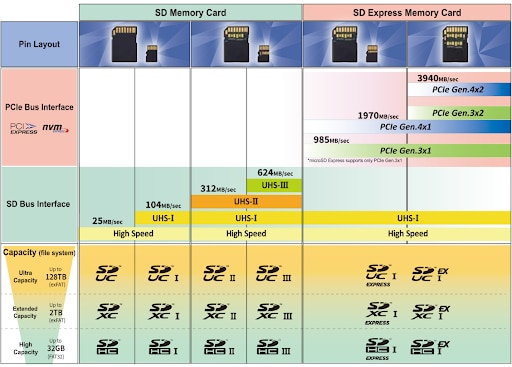
SD Express cards are different from earlier SD cards because they use PCIe and NVMe technology to support much higher transfer speeds. Traditional SD cards rely on older SD interfaces such as High Speed, UHS-I, or UHS-II. SD Express keeps the SD card form factor but adds a faster interface for supported devices.
What Is SD Express?
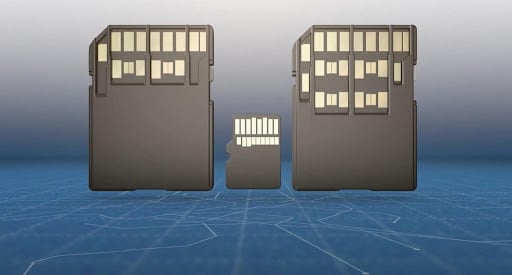
SD Express is an SD Association specification that adds PCIe and NVMe support to SD and microSD memory cards. PCIe is a high-speed interface used across modern computers, storage devices, and embedded systems. NVMe is a storage protocol designed for fast access to flash memory over PCIe.
By combining SD and microSD form factors with PCIe and NVMe technology, SD Express gives removable memory cards a major performance upgrade. In supported devices, SD Express can behave more like removable SSD storage than a traditional memory card.
SD Express vs Standard SD Cards
The biggest difference between SD Express and standard SD cards is the interface. Standard SD cards use traditional SD bus interfaces, while SD Express adds PCIe and NVMe for faster sequential and random access performance.
| Feature | Standard SD / microSD | SD Express / microSD Express |
|---|---|---|
| Interface | Traditional SD bus such as High Speed, UHS-I, or UHS-II | PCIe and NVMe technology |
| Speed | Depends on the SD interface and speed class | Can support much higher transfer speeds in compatible devices |
| Main Benefit | Wide compatibility and common device support | SSD-like removable storage performance |
| Compatibility | Works in supported SD or microSD slots | Requires SD Express or microSD Express support for full speed |
| Best Use | Cameras, phones, drones, embedded systems, and general storage | High-speed capture, gaming devices, professional workflows, and large file movement |

microSD Express vs microSD: What Is the Difference?
microSD Express is the microSD version of SD Express. It keeps the small microSD form factor but adds PCIe and NVMe support for higher performance in compatible devices.
A regular microSD card is still a strong choice for phones, cameras, drones, tablets, and embedded systems when standard removable storage is enough. microSD Express is better suited for devices that need faster file transfers, higher performance storage, or SSD-like removable media.
The key point is compatibility. A microSD Express card must be paired with a microSD Express-capable host to reach its higher performance. In older or non-Express devices, it may not deliver its full speed potential.
SD Express Speed: How Fast Is It?
SD Express can support much higher speeds than earlier SD card interfaces because it uses PCIe and NVMe. Earlier SD Express implementations support speeds up to 985 MB/s, while later SD Express specifications can support speeds up to 3940 MB/s when paired with the right host and interface support.
In practical terms, SD Express speed depends on both the card and the device. To get full SD Express performance, the host device must support SD Express. If the host only supports older SD interfaces, the card may operate at a lower compatible speed.
- Standard SD mode: Lower performance through traditional SD interfaces.
- UHS-I mode: Higher than standard SD, but still much slower than SD Express.
- SD Express mode: Uses PCIe and NVMe for much faster transfer speeds in supported devices.
Are SD Express Cards Backward Compatible?
SD Express cards are designed to keep backward compatibility with many existing SD hosts through the legacy SD interface. This means users can often access data in older devices, but they should not expect full SD Express speed unless the host device supports SD Express.
Backward compatibility is useful because it allows SD Express cards to fit into the broader SD ecosystem. However, the card, host, and interface must all support SD Express for the fastest performance.
SD Express vs UHS-I and UHS-II
UHS-I and UHS-II are earlier high-speed SD interfaces. They are widely supported and still useful for cameras, video devices, industrial systems, and general storage. SD Express goes further by using PCIe and NVMe, allowing the SD card format to reach much higher performance levels.
For many everyday applications, UHS-I or UHS-II may still be enough. SD Express becomes more valuable when the application requires faster data movement, high-resolution content capture, large file transfers, or storage performance closer to an SSD.
Why SD Express Uses PCIe and NVMe
PCIe and NVMe are used because they are proven technologies for high-speed flash storage. PCIe provides the physical interface for moving data quickly. NVMe provides the protocol for accessing flash memory efficiently.
This combination allows SD Express to support higher sequential transfer speeds, stronger random access performance, and more demanding workloads than traditional SD interfaces. It also allows SD Express to benefit from the broader development path of PCIe and NVMe storage technology.
Advantages of SD Express
SD Express offers several advantages over earlier SD card generations, especially for systems that require high-speed removable storage.
- Higher speed: SD Express can support significantly faster transfer rates than earlier SD interfaces.
- SSD-like performance: PCIe and NVMe help SD Express behave more like removable SSD storage in compatible devices.
- Familiar form factor: SD Express keeps the SD and microSD card form factors that many devices already use.
- Backward compatibility: SD Express can support access through legacy SD interfaces, although full speed requires an SD Express host.
- Broad application support: SD Express can support professional video, gaming, mobile computing, industrial systems, and data-intensive embedded applications.
When Should You Choose SD Express?
SD Express is most useful when standard SD card performance is not enough. It is designed for devices and applications that need faster removable storage while keeping the SD or microSD form factor.
- High-resolution video: Useful for demanding video workflows and large media files.
- Gaming systems: Helpful where faster loading and storage performance matter.
- Multi-channel video capture: Useful for systems recording multiple streams or high-bitrate content.
- Automotive and transportation: Supports systems that collect large amounts of sensor and video data.
- Industrial and IoT systems: Helpful for compact systems that need fast removable storage.
- Professional workflows: Useful when large files need to be moved quickly between devices.
Low Power and Interface Benefits
SD Express also benefits from modern interface design. PCIe uses high-speed differential signaling, which helps support fast data transfer and efficient operation. Newer low-power states also help systems balance performance and energy use.
Because SD Express can move more data in less time, supported systems may spend less time actively transferring data and more time in lower-power states. This can be helpful for mobile, embedded, and industrial applications where efficiency matters.
What Does SD Express Mean for Consumers?
For most consumers, SD Express means faster removable storage when the device supports it. It can help with larger files, faster transfers, higher-resolution media, and more responsive storage performance.
However, SD Express is not always necessary. If your device only supports standard SD, UHS-I, or UHS-II, a traditional SD or microSD card may be the better choice. The best card depends on the device, required speed, capacity, endurance, and compatibility.
SD Express and AMP Storage Support
AMP supports customers that need standard and advanced memory storage solutions for commercial, industrial, embedded, defense, transportation, and application-specific systems. If you are evaluating SD Express, microSD Express, SD cards, or other removable storage options, AMP can help review speed, capacity, compatibility, lifecycle, and reliability requirements.
To learn more about AMP removable storage options, contact our team at 714-460-9800 or sales@ampinc.com.
FAQs About SD Express
SD Express cards are different because they add PCIe and NVMe technology to the SD card format. This allows much higher transfer speeds than traditional SD interfaces when used in compatible devices.
Standard SD cards use traditional SD interfaces such as High Speed, UHS-I, or UHS-II. SD Express adds PCIe and NVMe support for much higher performance in supported host devices.
No. microSD Express uses the microSD form factor, but it adds PCIe and NVMe technology for higher performance. A regular microSD card does not provide SD Express performance.
SD Express speed depends on the specification, card, and host device. Earlier SD Express implementations support up to 985 MB/s, while later SD Express specifications can support speeds up to 3940 MB/s in compatible systems.
SD Express cards are designed to support backward compatibility through the legacy SD interface, but full SD Express speed requires an SD Express-compatible host device.
Yes, SD Express can be much faster than UHS-II when used in an SD Express-compatible host. UHS-II is still useful and widely supported, but SD Express uses PCIe and NVMe for higher performance.
SD Express is best suited for users and systems that need very fast removable storage, such as high-resolution video workflows, gaming devices, industrial systems, automotive data capture, and large file transfers.